Live · in pilot with BC civil contractors
Purchasebook by MKTSS
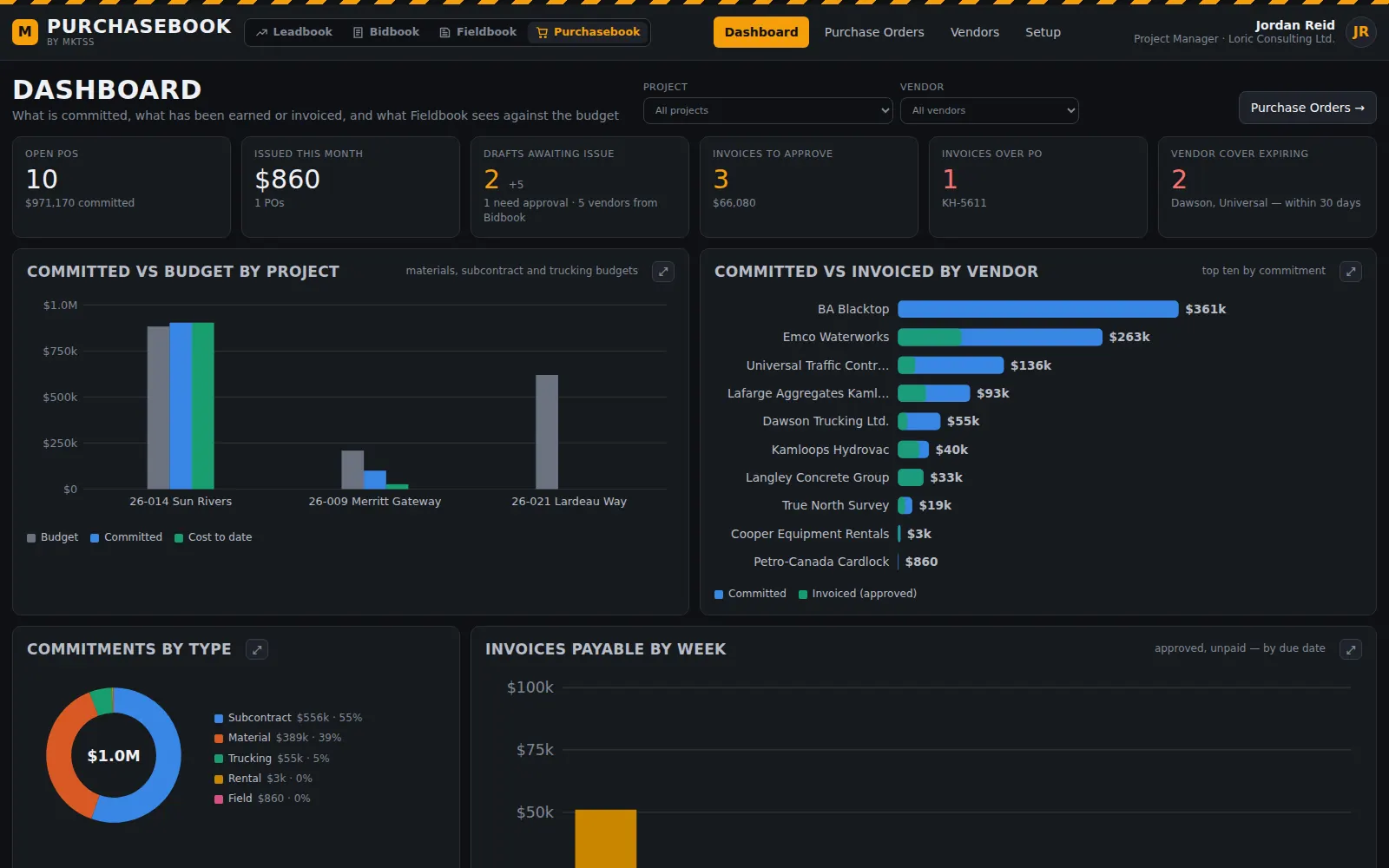
Committed cost, on the right cost code
When the bid is awarded, the vendors the estimate carried become draft purchase orders — numbered your way, lines already on your cost codes with the quoted quantities and rates. Issue them and Fieldbook shows the commitment against the budget from that moment; the cost posts up front, as production progresses, or once the invoice is in. Invoices are read and matched three ways before anyone approves them.
The link between Bidbook and Fieldbook — what was bid, what is committed, what has been earned and what has been invoiced, per cost code.
Award → draft POs
The estimate's vendors become purchase orders, no retyping
Bidbook already knows who is pricing what: the quotes the estimator tied to the estimate name the vendor, the scope, the quantities and the rates, and every cost item carries a cost code. On award — the same click that creates the Fieldbook project — Purchasebook receives one draft PO per vendor the estimate carried: subcontracts, supply and trucking each as their own PO type, lines coded from the cost item, quantities from the estimate with waste, rates from the quote.
Nothing is issued automatically. The drafts sit in Incoming from Bidbook until a project manager reviews, adjusts and issues them. A scope the estimate carried at a plugged rate comes over flagged with the estimate value and no vendor, so the PM sources it rather than forgetting it.
- One draft per carried vendor, typed Subcontract / Material / Trucking, lines on the cost code and bid item they came from
- Source shown on every line — which cost item, which quote — so the PM can see why the number is what it is
- Plugged scopes flagged for sourcing; awarded bids without carried vendors still listed for manual drafts
- A PO from a quotation on its own: paste or drop the vendor's quote, the lines are read and coded, tick what you want
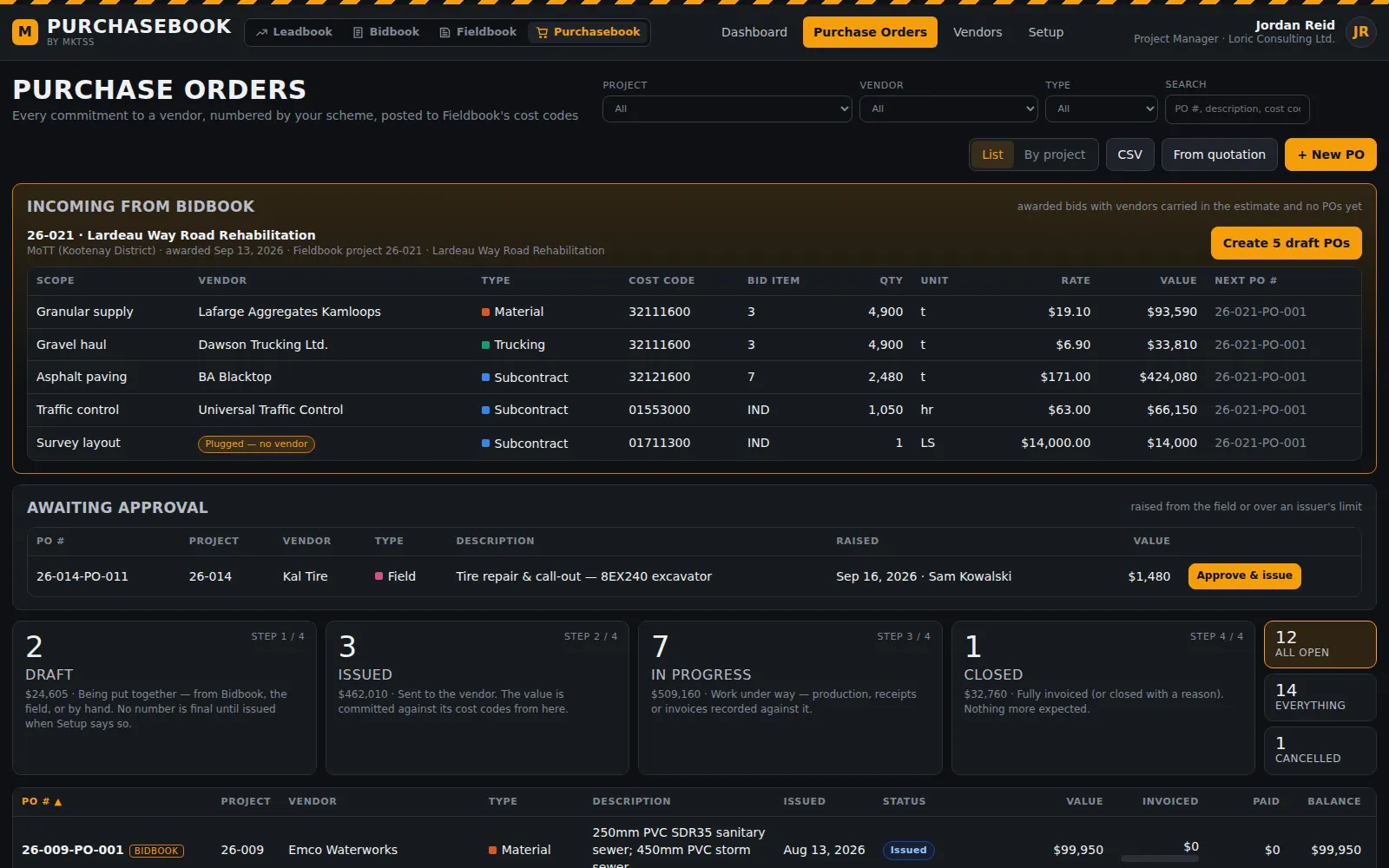
An awarded bid's carried vendors, one line per scope, ready to become numbered draft POs; the register below.
Purchase orders
A commitment against cost codes, from draft to closed
Every PO line carries the project, the cost code, the bid item where it came from the estimate, description, quantity, unit, rate and a tax flag; the PO's value is its lines plus approved change orders. Draft, Issued, In Progress, Closed — the status strip filters the register, which lists or groups by project, sorts on any column and exports to CSV.
Open a PO and the tabs walk its life: the header with terms, dates, ship-to, allocation mode, holdback and who approved it; the lines; change orders as revisions that keep the number (-R1, -R2) with the original on record; progress per line — produced from Fieldbook's time cards, received from delivery tickets, % complete for lump sums, earned value; the invoices; the activity log.
- Approval limits from Setup: a foreman's field PO up to one amount, a PM up to another, an admin above — each PO shows who approved and when
- Field POs raised from Fieldbook's time card page draw from the same number sequence and land here for approval
- Issue PO checks every line is coded and the issuer is within limit; Print / PDF; Close when fully invoiced or with a reason; Cancel
- Import an existing PO log from a spreadsheet with the columns mapped for you to confirm
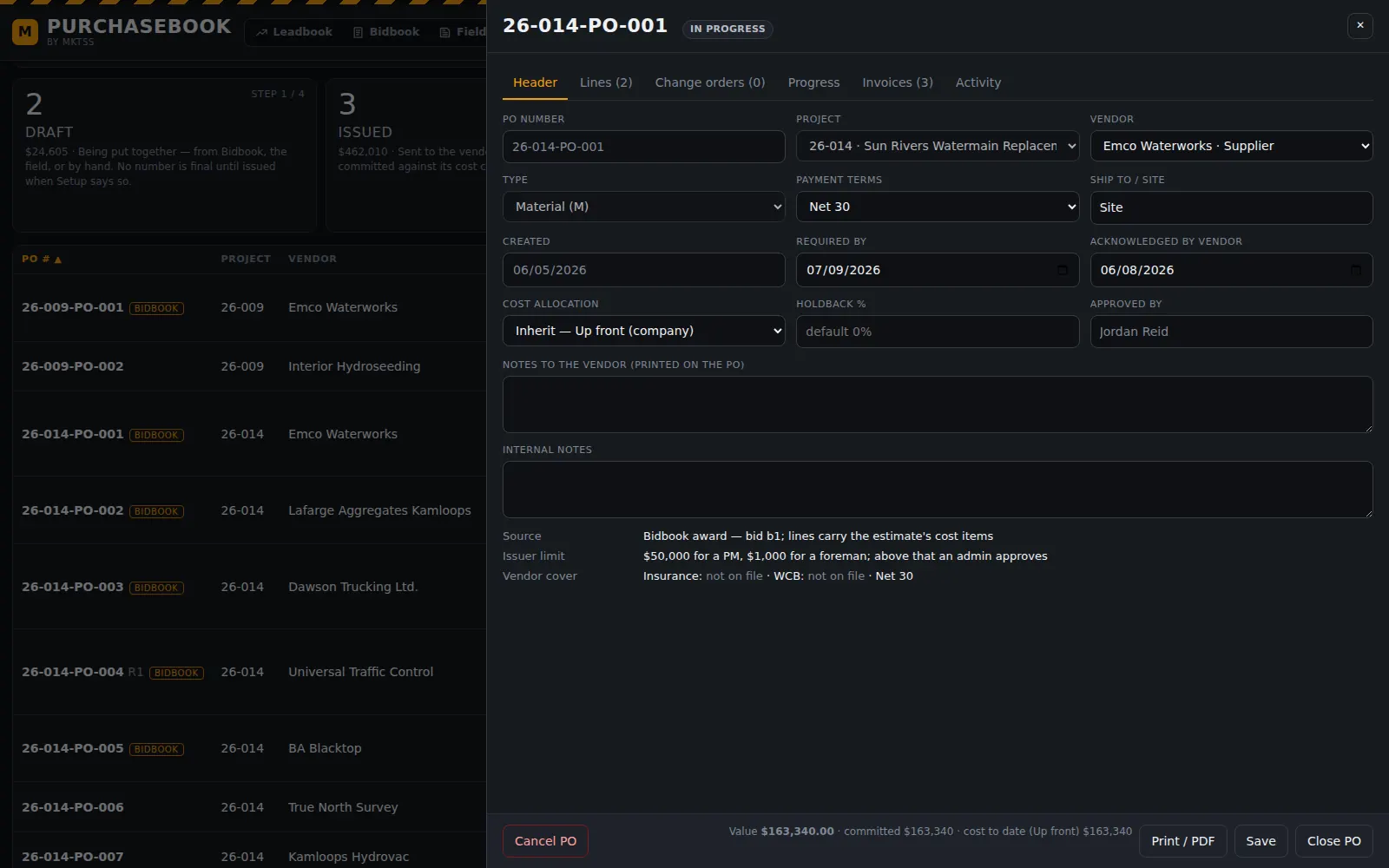
A material PO from the Bidbook award — header, lines, change orders, progress, invoices and activity on their tabs.
Cost to Fieldbook
Committed from the day it is issued; cost when you say so
The moment a PO is issued, Fieldbook shows the commitment against the cost code's budget. When that commitment becomes cost to date is a company setting — overridable per project and per PO — because contractors run this three ways: up front, the full PO value on the issue date; as production progresses, earned in proportion to the time-card quantities on the cost code (or the % complete the PM records on a lump sum, or delivery receipts for supply); or once an invoice is received, the approved amount on the invoice date.
The dashboard's What Fieldbook sees panel shows every cost code on the project with Budget · Committed · Cost to date · Forecast · Variance under the current mode, with a switch to preview the other two. Switching the mode never rewrites history — the PO, the production and the invoices are the facts; the mode is the lens.
- Forecast at completion per cost code = the larger of committed and cost to date, plus the remaining labour and equipment forecast
- Committed over budget flagged on the dashboard and in the attention list
- Per-line switch for supply items: earn by production or by receipt
- Committed / cost to date per cost code served to Fieldbook's Track Budgets
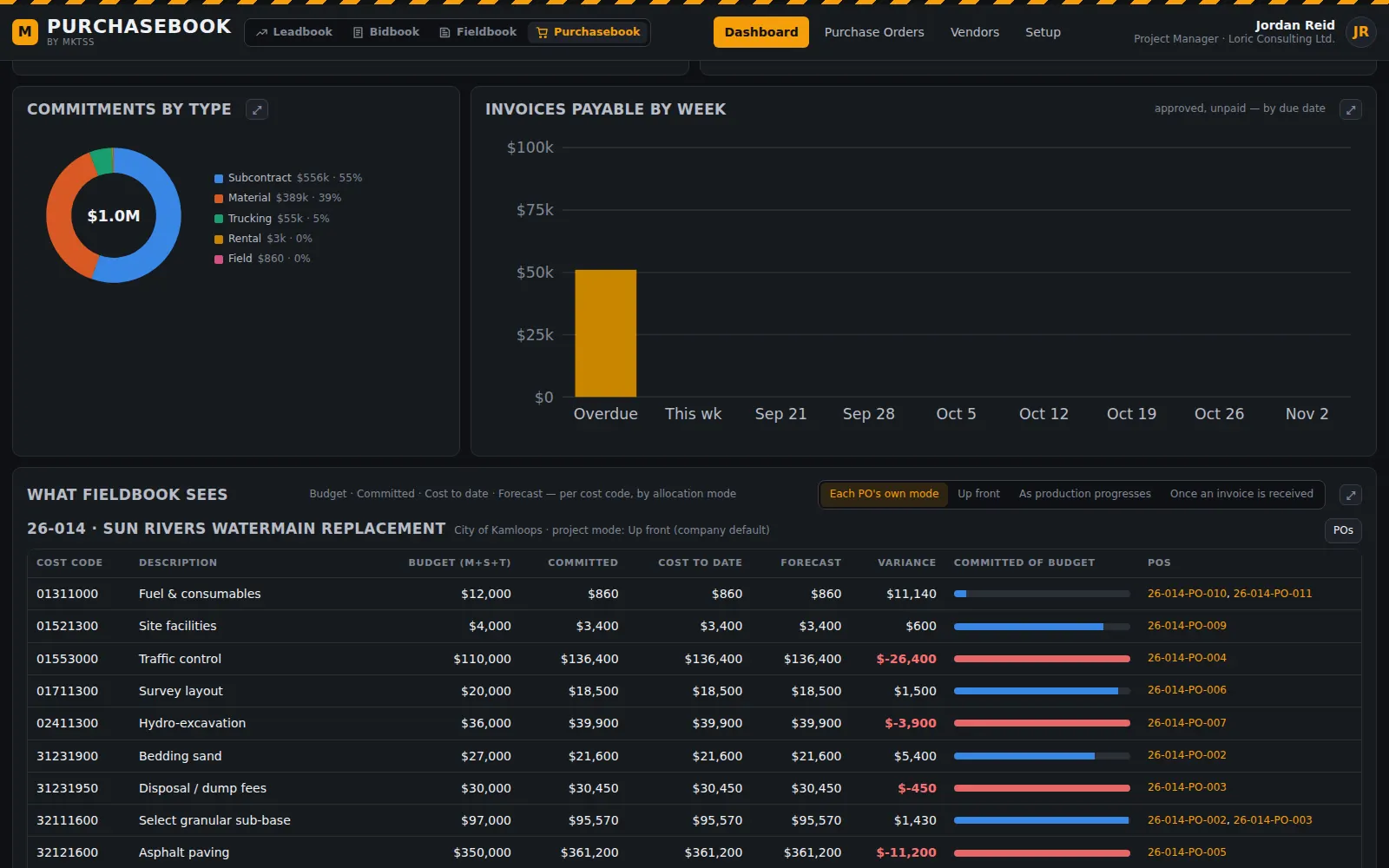
Budget, committed, cost to date and forecast per cost code, with the POs behind each line and a switch to preview each allocation mode.
Invoices
Read, matched three ways, then approved
Drop the vendor's invoice on its PO. The assistant reads the vendor, invoice number, date, lines, tax and total and names which PO line each billed line is for; the page builds the match and checks it three ways — PO quantity, received or produced quantity, invoiced quantity. Over the PO, a rate that differs from the PO, a line that isn't on the PO, a duplicate invoice number: each is flagged, and an invoice must be approved before it counts anywhere.
Holdback is withheld on subcontract invoices when the PO says so and released as its own entry. Received → Approved → Paid, with what's left to invoice on every PO, and approved invoices flow to Export to Accounting as AP bills with a job-cost distribution by cost code.
- Invoice PDF kept on the invoice; vendor wording remembered per vendor, as in Bidbook's quote matching
- Three-way match with flags: over PO quantity, rate differs, not on PO, duplicate
- Holdback percentage and scope from Setup (subcontracts only, or all); GST and PST per PO type
- Invoices payable by week on the dashboard from payment terms; invoices awaiting approval and over PO in the attention list
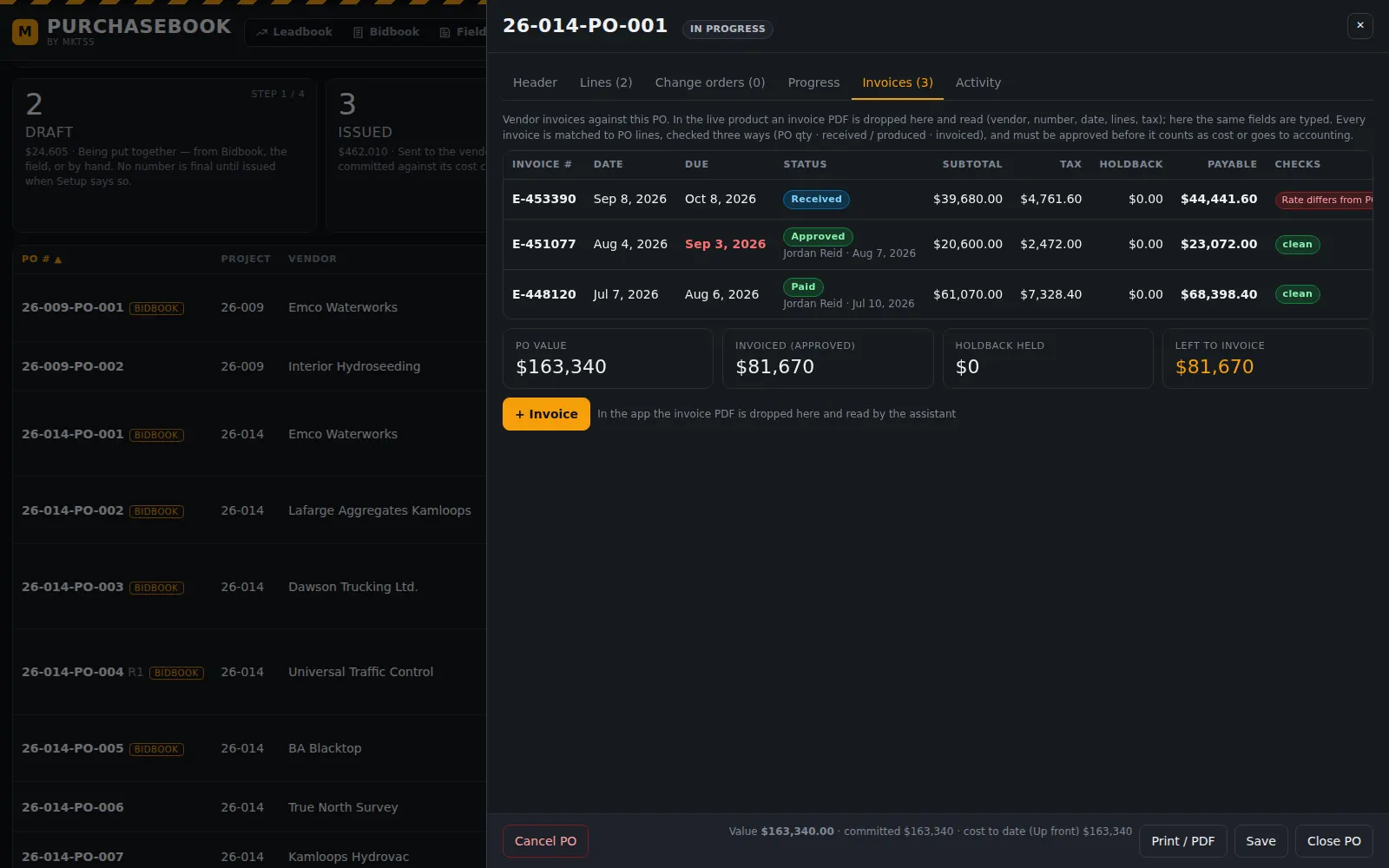
Three invoices on one PO — one flagged because its rate differs from the PO — with what's left to invoice.
Vendors
The same directory Bidbook selects from, with your own fields on top
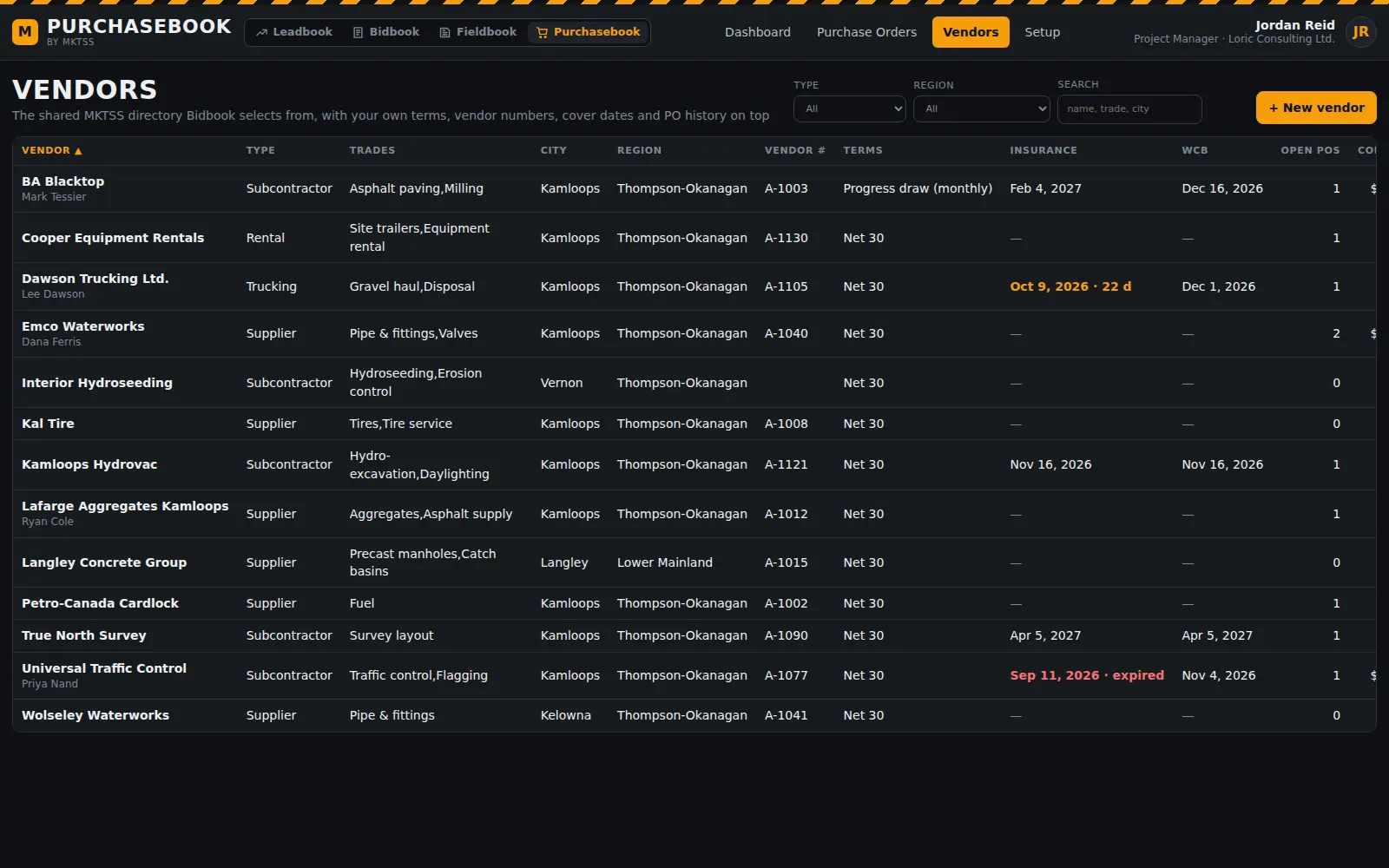
Vendors are the MKTSS-wide directory Bidbook invites to price — a vendor that signs up is available to every contractor — and Purchasebook adds what only you need to know: your vendor number for accounting, payment terms, default PO type and cost code, insurance and WCB expiry, notes, and the PO history with committed, invoiced and paid totals.
- Type, trades, city and region; filter and search
- Insurance and WCB expiry shown and warned on — a PO to a vendor whose cover has lapsed is flagged before it is issued
- Open POs, committed, invoiced, paid and last PO per vendor
- Add a vendor here and Bidbook can invite them on the next tender
Numbering & setup
PO numbers your way, and the rules the POs follow
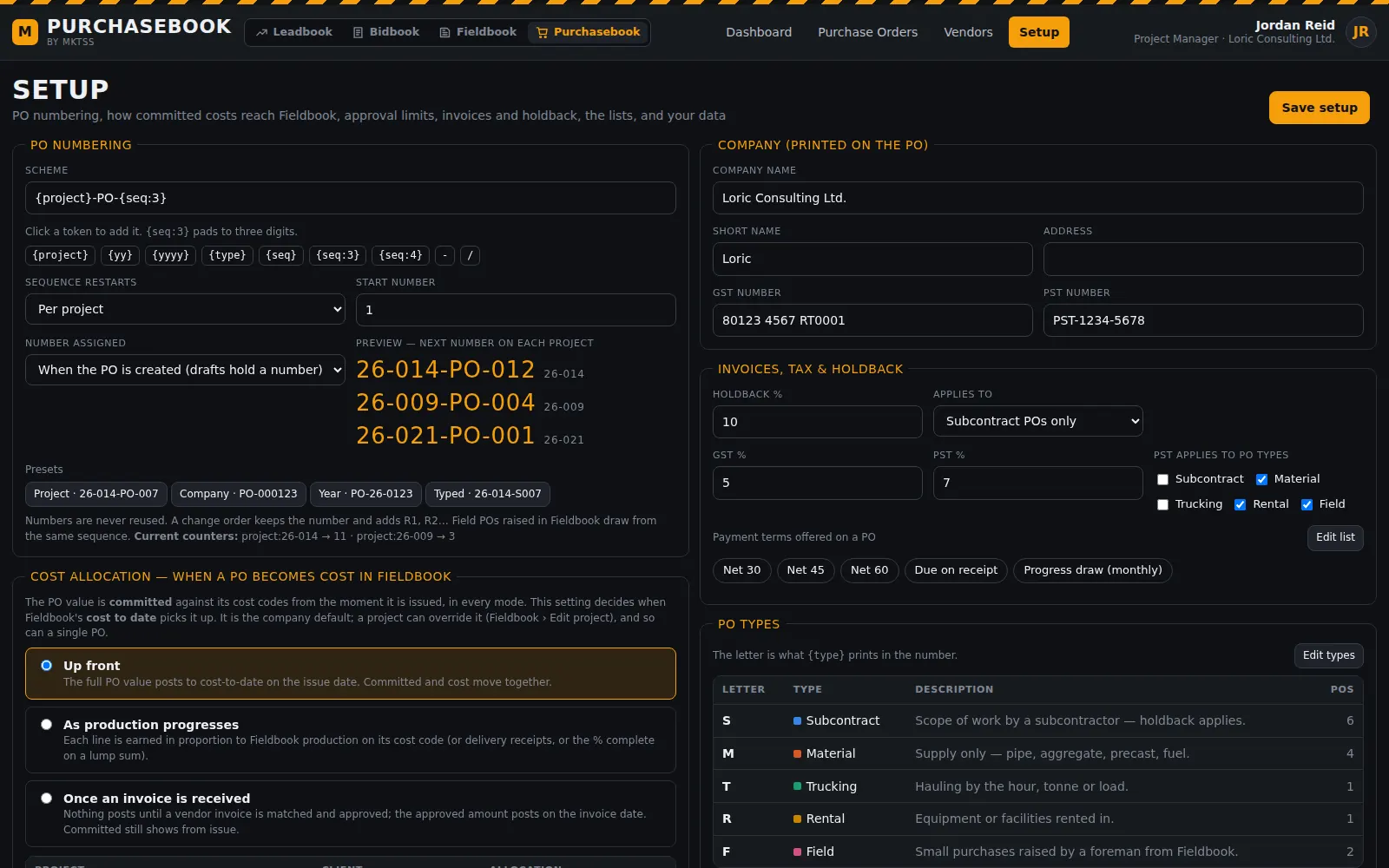
The numbering scheme is built from tokens — project, year, PO type letter, a padded sequence and any separators — with a live preview of the next number on each project. The default is {project}-PO-{seq:3} (26-014-PO-007), one sequence per project; presets for a company-wide or yearly sequence are a click away. Numbers come from the server, are assigned on creation or on issue, and are never reused; a change order keeps the number and adds a revision.
- Cost allocation mode as the company default, with the table of projects that override it
- Approval limits for foremen and PMs; admins above
- Company details, GST and PST numbers printed on the PO; holdback percentage and scope; tax rates and which PO types carry PST
- Payment terms, PO types with their letters, units, and the terms & conditions printed on every PO
- Dark or light appearance; export and import; one sign-in with the other three products
What's next
Where the automation lands
The issued PO emails from your company name with your terms and a link for the vendor to acknowledge, the same way Bidbook's invitations work. Committed, cost to date and forecast columns land on Fieldbook's Track Budgets, and the field PO form goes on the time card page. Issued PO rates feed back into Bidbook's Master Setup — the live rate library, tagged by vendor, region and date. The Ask box answers "what have we committed on Sun Rivers" and "what's left to invoice on the paving sub", and vendor cover expiries feed the morning briefing.
Everything in Purchasebook today