Live · in pilot with BC civil contractors
Bidbook by MKTSS
Estimating from your own crews and history
Drop the tender package in and the bid items are read out of the schedule of quantities. Cost items come from your own library and your past estimates — crews, productions, materials, subs and trucking — and the vendor quotes tie straight to the lines they price. Review, mark up, round, and fill the owner's form with the submitted prices.
Same cost codes, labour classes and rates as Fieldbook — the awarded estimate becomes the project budget with one click.
1 · Bid Hub
The tender package in, the bid items out
Every bid starts in the Bid Hub. Drop the ITT, schedule of quantities, specs, drawings, geotech and addenda in; Bidbook stores them with the bid, sorts contract documents from drawings, and reads the bid items straight out of the schedule — item numbers, spec sections, descriptions, units, quantities and the headings and sub-totals the owner used. Closing date and time, site meeting, completion dates, contract form, bonding and liquidated damages come out of the ITT the same way.
The list is checked and confirmed before the estimate is built, so an addendum that changes quantities updates the items already priced, flags the ones removed, and adds the new ones — nothing already estimated is lost.
- Schedule of quantities read from PDF or Excel, with headings, spec sections and sub-totals kept
- Bid details — owner, closing, site meeting, substantial and total completion, bonding, LDs, form of contract — read from the ITT
- Cost codes suggested for every bid item in one pass; your own eight-digit or two-level codes, whichever you use
- Bid items numbered in fives so addenda slot in; internal number, client item, description, unit and quantity
- Confirm / reopen the item list; re-import an addendum as a merge, not a replace
- Bid Details and a punch list on the Bids page — what closes this week, what has no estimator, what hasn't been handed to Fieldbook
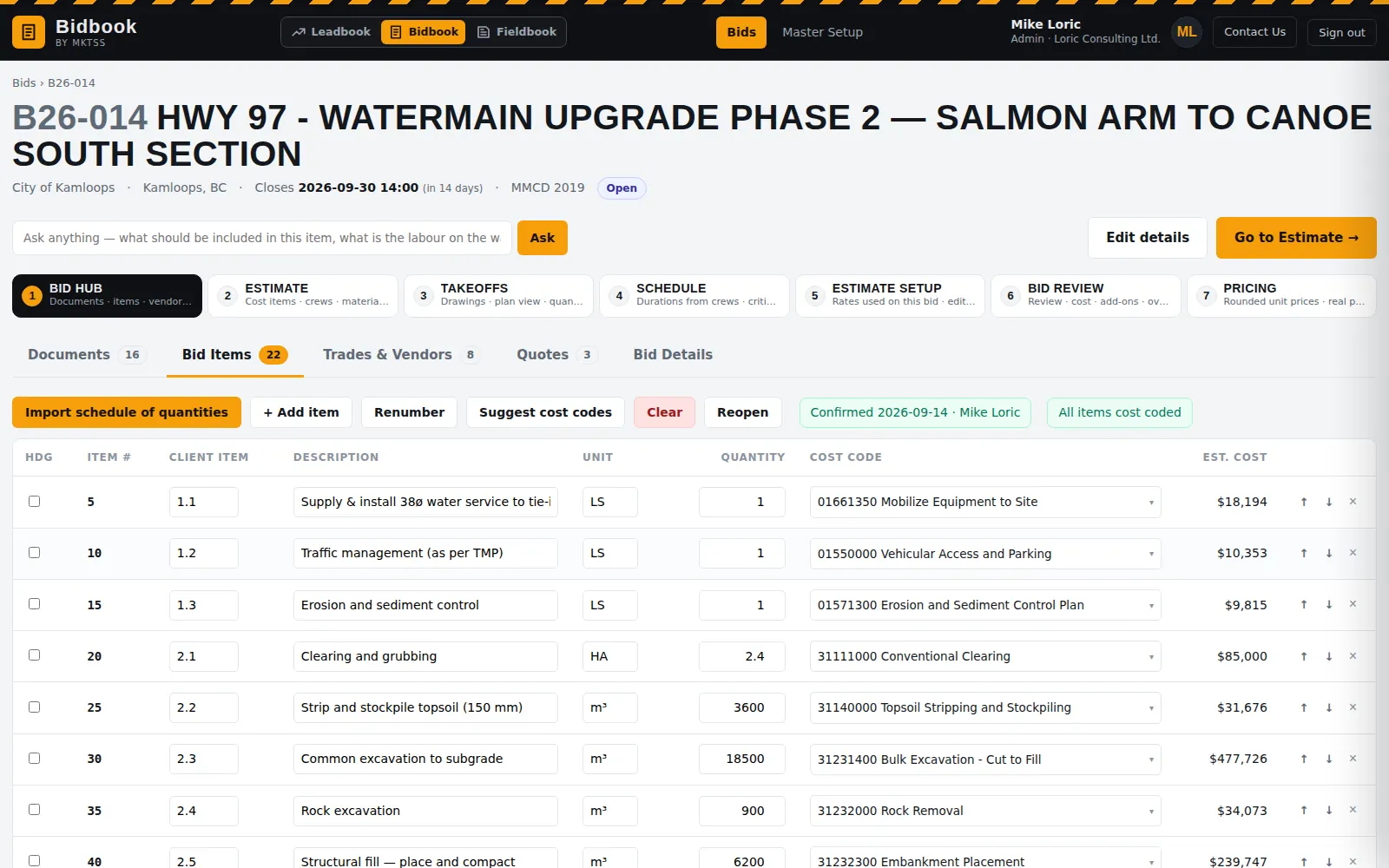
Bid items read from the schedule of quantities and coded — confirm the list, then build the estimate.
Trades, vendors & quotes
Invitations out, quotes back, tied to the lines they price
The bid items tell Bidbook which trades need pricing — asphalt, aggregates, precast, traffic control, hydroseeding. Pick the subcontractors and suppliers from the directory nearest the job, write the invitation once, and they get a link to download the documents and upload their quotation; Bidbook tracks who downloaded what.
When a quote comes in — a PDF, a saved email, even a photo — it is read for the vendor, scope and prices and laid out by bid item with every quoted material under it. Lines match to the materials already on the estimate, odd descriptions are matched by hand once and remembered for that vendor, several quoted lines can combine into one estimate material, and a quote in a different pipe size than the estimate carries is offered as a swap. Confirmed prices show green on the cost items.
- Trade catalogue you can edit — subcontract, supply and trucking headings, your own trades and keywords
- Vendor directory by distance from the site; invitation message per company; download tracking per vendor
- Quotes read by the model: vendor, scope, exclusions, validity, unit prices and lump sums
- Balanced comparison across vendors, plugged lines for scope one vendor left out, lowest balanced flagged
- Matched / needs matching / new entry per line; create a material in the library from the quote and place it in the tree
- Prices that came from quotes update the master rates, so the library stays current
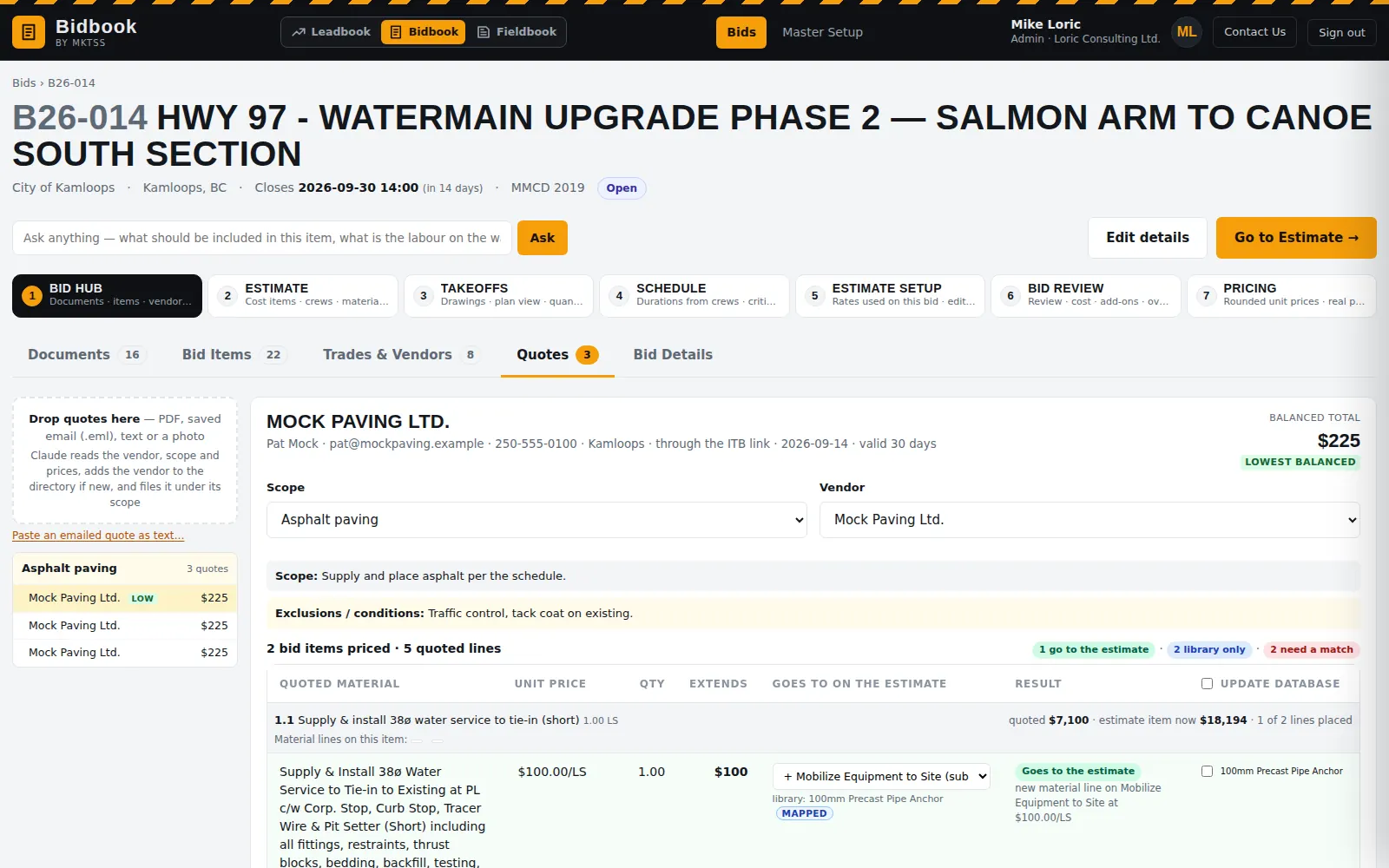
Trades & Vendors picks who to invite; the Quotes workspace ties each quoted line to the estimate.
2 · Estimate
Cost items from crews and productions, not a rate book
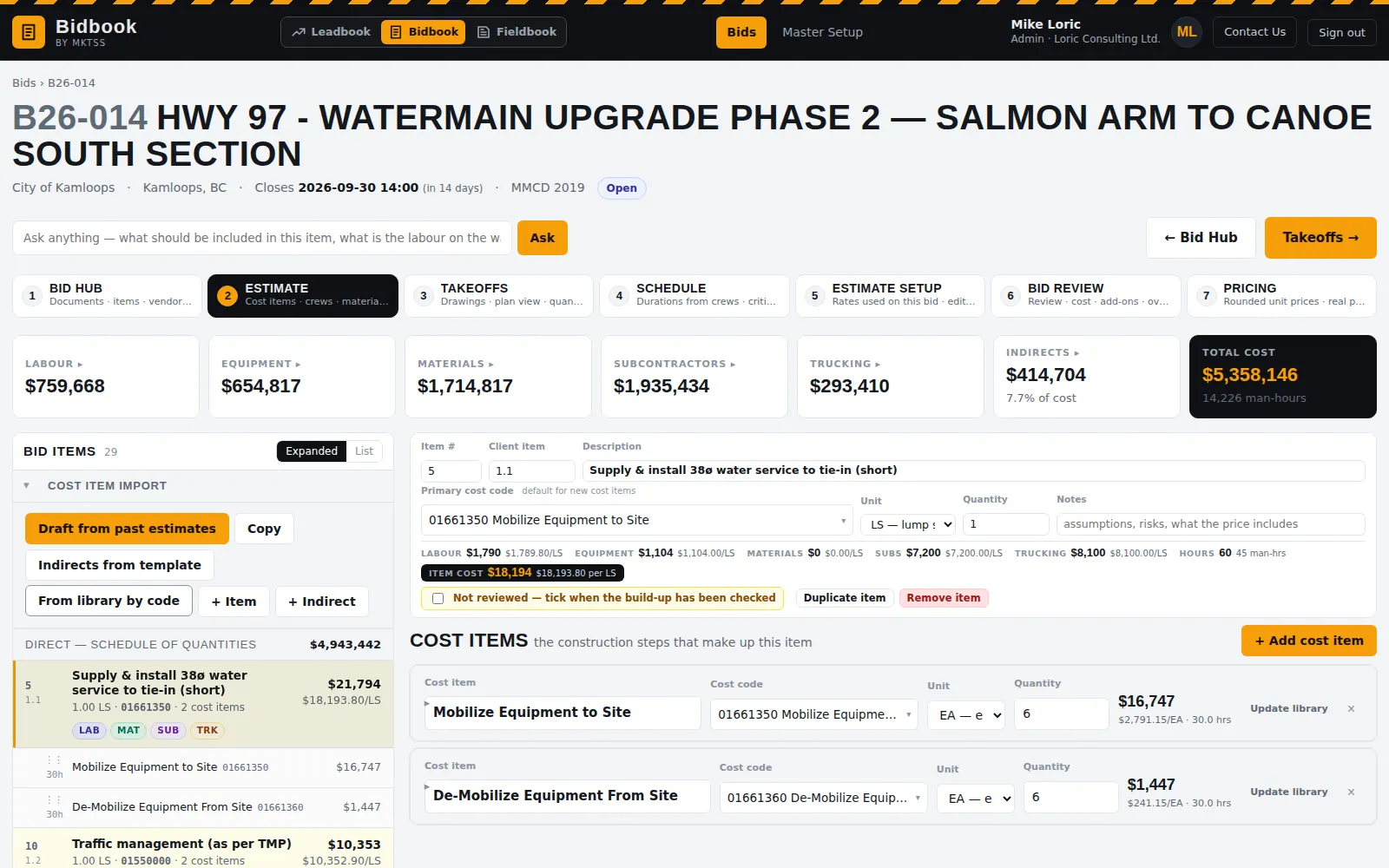
Each bid item holds one or more cost items — the construction steps that build it: a crew of labour classes and equipment, a production rate in units per hour or hours per unit, the materials with waste factors, subcontractors and trucking. A watermain item brings pipe, trench and backfill, bedding sand and testing; each carries its own cost code so the budget lands in Fieldbook the way the field reports it.
The tree on the left shows every bid item with its cost items and the labour / material / sub / trucking tags; the panel on the right is the open item. Expanded or list view, drag a cost item onto another bid item (copy or move, quantities rescaled), and the page never jumps back to the top after a change.
- Crews built from labour classes and equipment classes with default operators, fractional pieces and trucking members; open and modify a crew inside the estimate
- Productions in units per hour or hours per unit; extended quantity, waste and unit cost per line
- Materials, subcontractors and trucking sections always present on a cost item; sales tax (PST) applied per material
- Indirects numbered from 10000 — mobilization, supervision, survey, site facilities, traffic control, LOA and travel by man-days — or assigned to a bid item
- Estimate Setup: only the labour, equipment, materials and fuel this bid uses, editable rates per bid, overtime rules and WCB, regional labour rate tables
- Reviewed / unreviewed state on every bid item; unreviewed stays highlighted until the build-up is checked
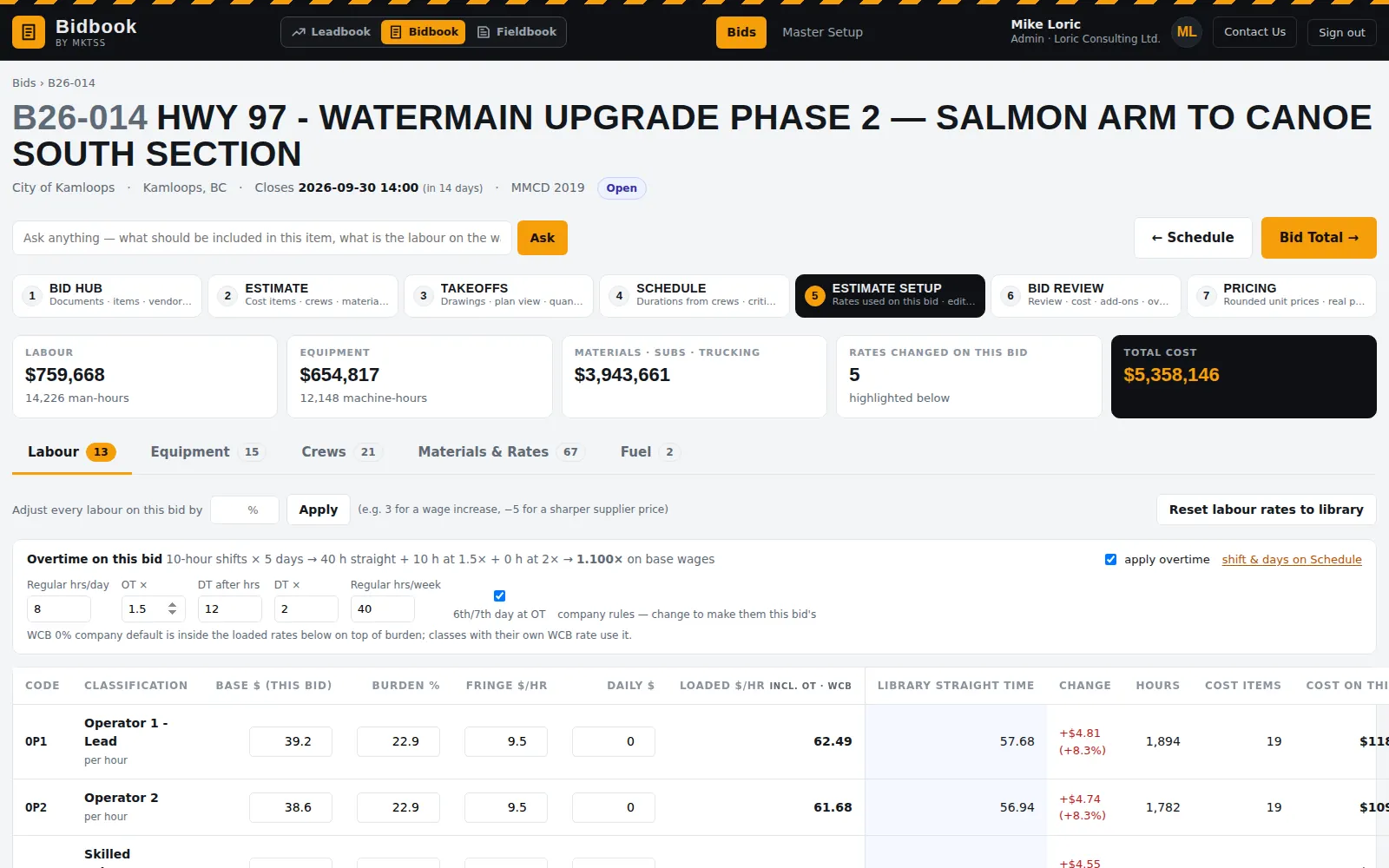
Estimate Setup holds the rates for this bid only — adjust labour across the board, switch the regional rate table, set overtime and WCB.
Master Setup · library & history
Your codebook, your crews, your past estimates — drafting the next one
Master Setup is the library everything draws on: labour classes and equipment classes shared with Fieldbook, crews, cost items and materials rolled up by the levels of your own codebook (division › category › group › size), subcontractors and suppliers, cost codes. Import it from the estimating software you use today — spreadsheets are mapped column by column with the model's help, and items that arrive without headings are categorised for you to confirm.
"How We Build" is where past estimates, schedules and cost reports go. From them, Draft from past estimates builds a new bid: the closest past bid item by description and size brings its cost items scaled to the new quantity, library cost items fill the gaps, an indirects template proposes the indirects, and the estimator ticks what to apply. Templates are estimates too — worked examples you keep for the next similar job.
- Labour, equipment, crews, cost items, materials & rates, subs & suppliers, cost codes — headings you add, rename and remove in place
- Importers for labour, equipment, crews, cost codes, the cost item codebook and its resources, with AI column mapping
- Past estimates (including cost report PDFs from your current software), schedules and job cost history on the How We Build shelves
- Draft from past estimates: most recent wins unless a majority of past bids built the item the same way; size-aware matching; per-line accept, change or remove
- Copy cost items between estimates in a two-column workspace with quantity scaling
- Sales tax per material, fuel type and consumption per equipment class, optional repair & maintenance
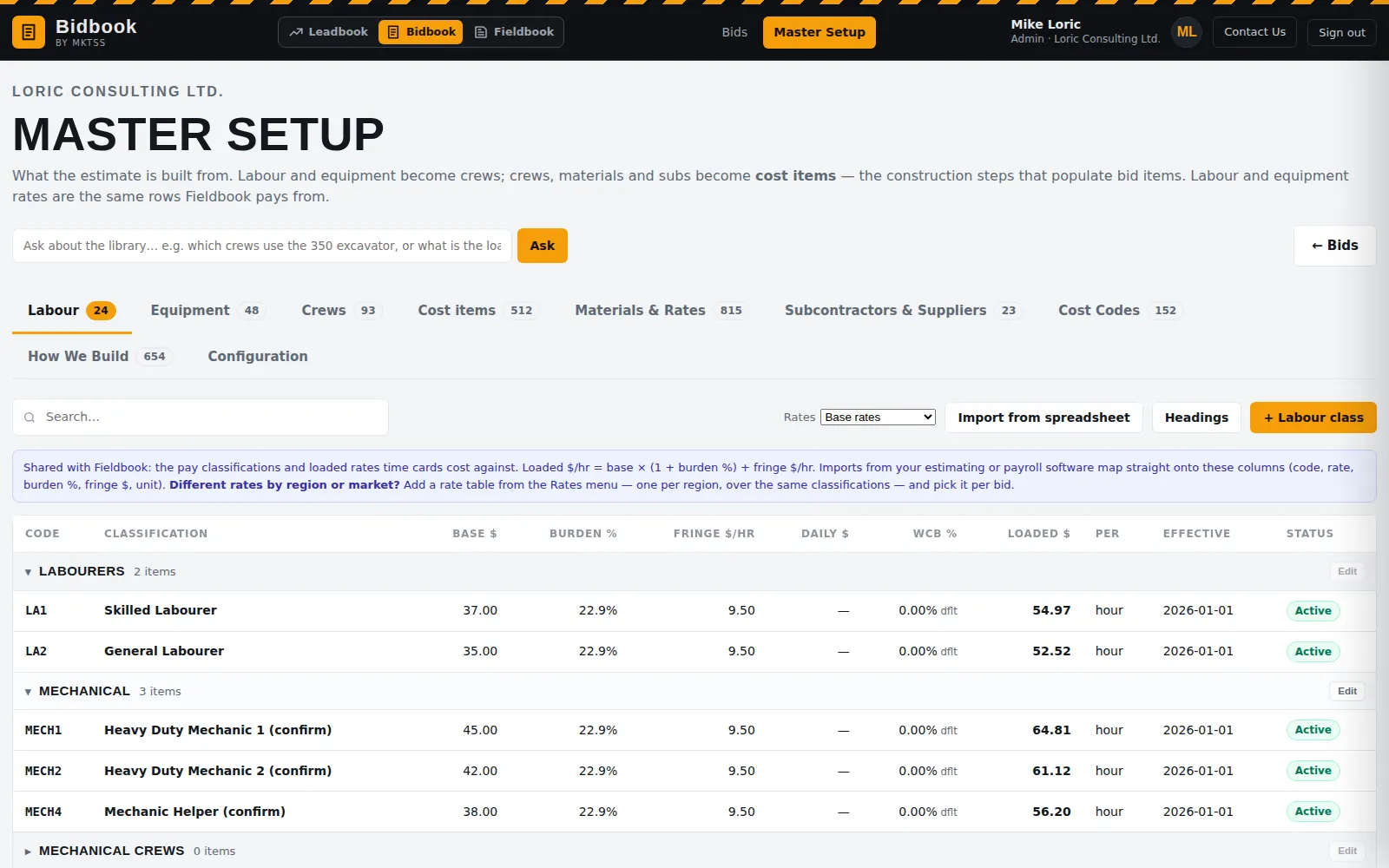
The same labour classes and loaded rates Fieldbook pays time cards from; equipment, crews, cost items, materials and vendors on the other tabs.
3 · Takeoffs
Quantities from the drawings, tied to the cost item
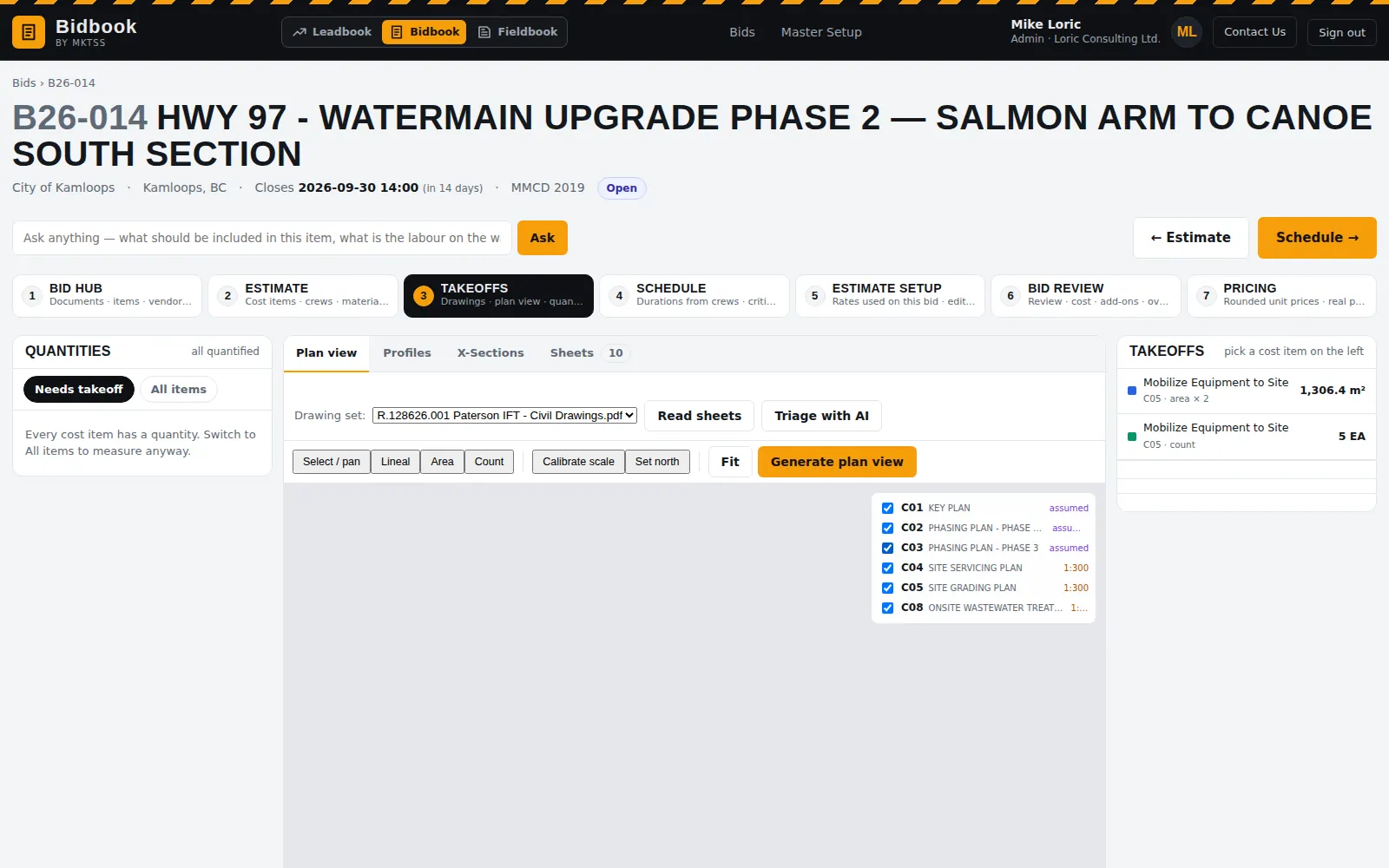
Not every tender comes with a schedule of quantities, and the ones that do still need the lengths behind "services, per each". Takeoffs reads the drawing set: the model triages the sheets — cover, index, notes, plans, profiles, sections — finds the scale and north arrow, and registers the plan sheets so they stitch into one plan view. Measure lineal metres, areas and counts on the plan and the quantity lands on the cost item you picked, beside what the schedule says.
- Drawing PDFs indexed page by page; sheet numbers, titles, scales and units read off the title blocks
- Plan view with automatic registration and a manual calibration fallback
- Lineal, area and count takeoffs to cost items; conversion factors per item
- Quantity vs schedule comparison so the difference is visible before you price it
- Profiles and cross-sections for earthworks are next
4 · Schedule
A construction schedule that falls out of the estimate
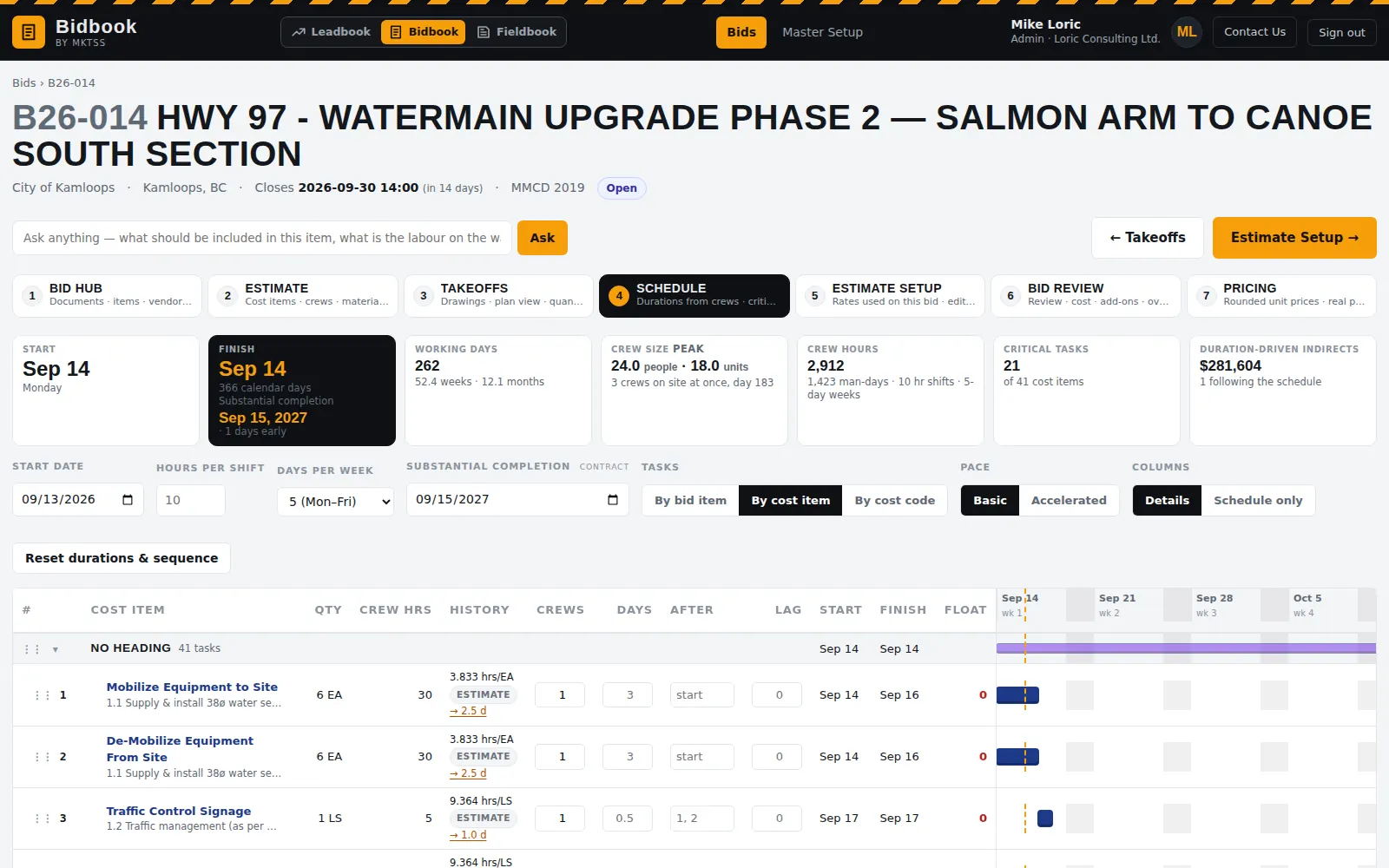
Durations come from the crews and productions on each cost item — quantity ÷ (crew × rate) — so the schedule exists as soon as the estimate does. It is grouped under the schedule of quantities headings, reorders by drag, rolls up to headings only, and shows crew size and peak crews, working days, the finish against the substantial completion date from the contract, and the indirects that scale with duration.
- By bid item, by cost item or by cost code; headings with their items beneath, tasks at level two
- Basic or accelerated pace; drag to re-sequence; lag and float; history column from your past schedules
- Dates and the scroll bar stay pinned; a draggable divider between the data and the timeline; Schedule-only view
- Substantial completion from the contract documents shown against the scheduled finish
- Duration-driven indirects — supervision, site facilities — recalculate with the schedule
6 · Bid Review
Markup, additional costs, and a second pair of eyes
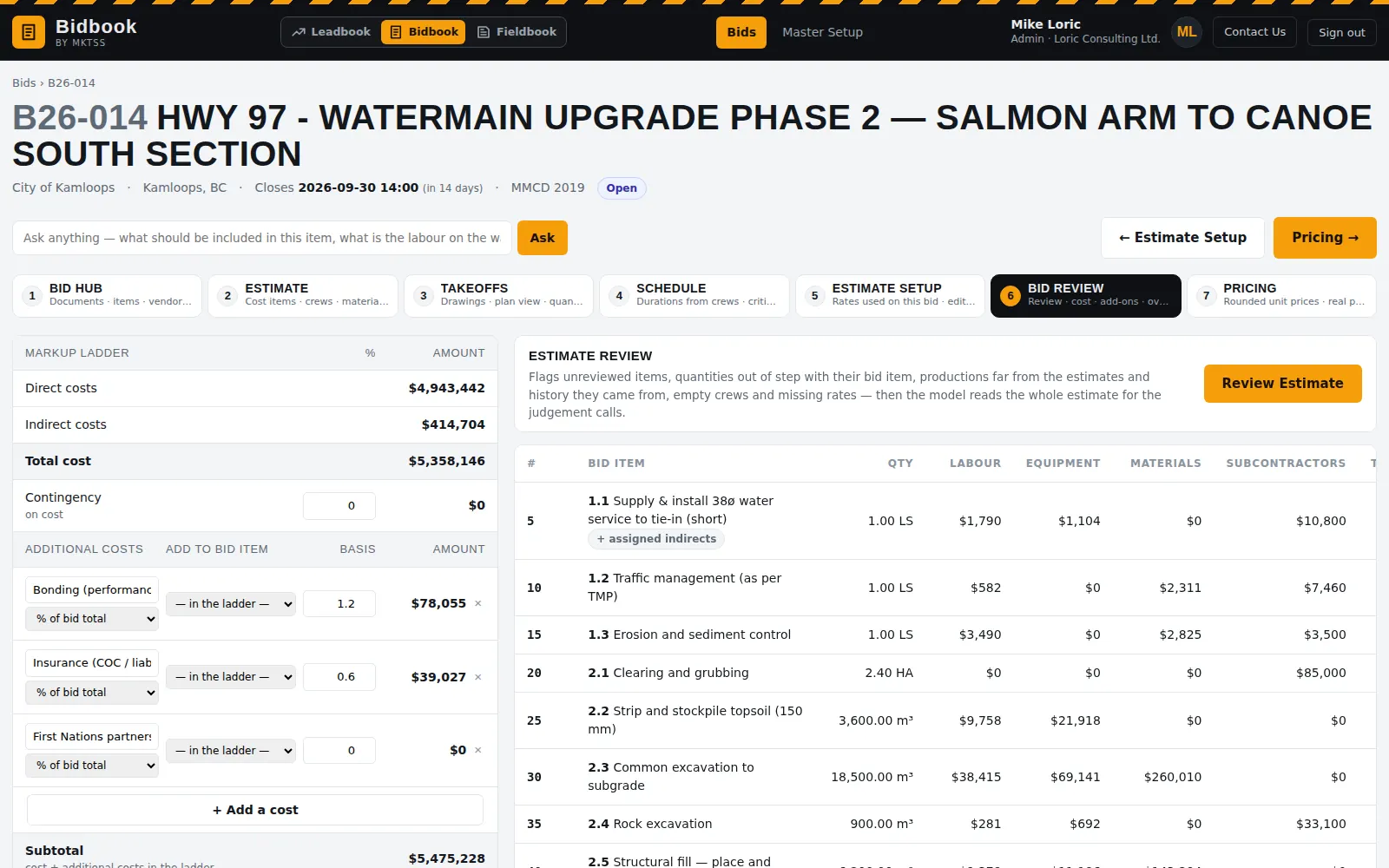
The markup ladder runs the way you price: direct cost, indirects, contingency, then bonding, insurance and partnership costs as a percentage of bid total or a fixed amount, overhead, and profit on top of all of it. An additional cost can be added to a bid item instead of spread, and it becomes a subcontractor line there.
Review Estimate reads the whole estimate the way a chief estimator would: unreviewed items, bid-item quantities out of step with their cost items, productions far from the estimates and history they came from, empty crews, missing rates. Findings are tinted high / medium / low on the bid item list, with the reason, and cleared when you are done.
- Cost by labour, equipment, materials, subs, trucking; indirects; contingency on cost; additional costs; overhead; profit
- Additional costs in the ladder or placed on a bid item
- Review findings with severity, where, and why; clear with one button
- Bid total by bid item with the five buckets, ready for Pricing
7 · Pricing & bid forms
Round it, unbalance it, and fill the owner's form
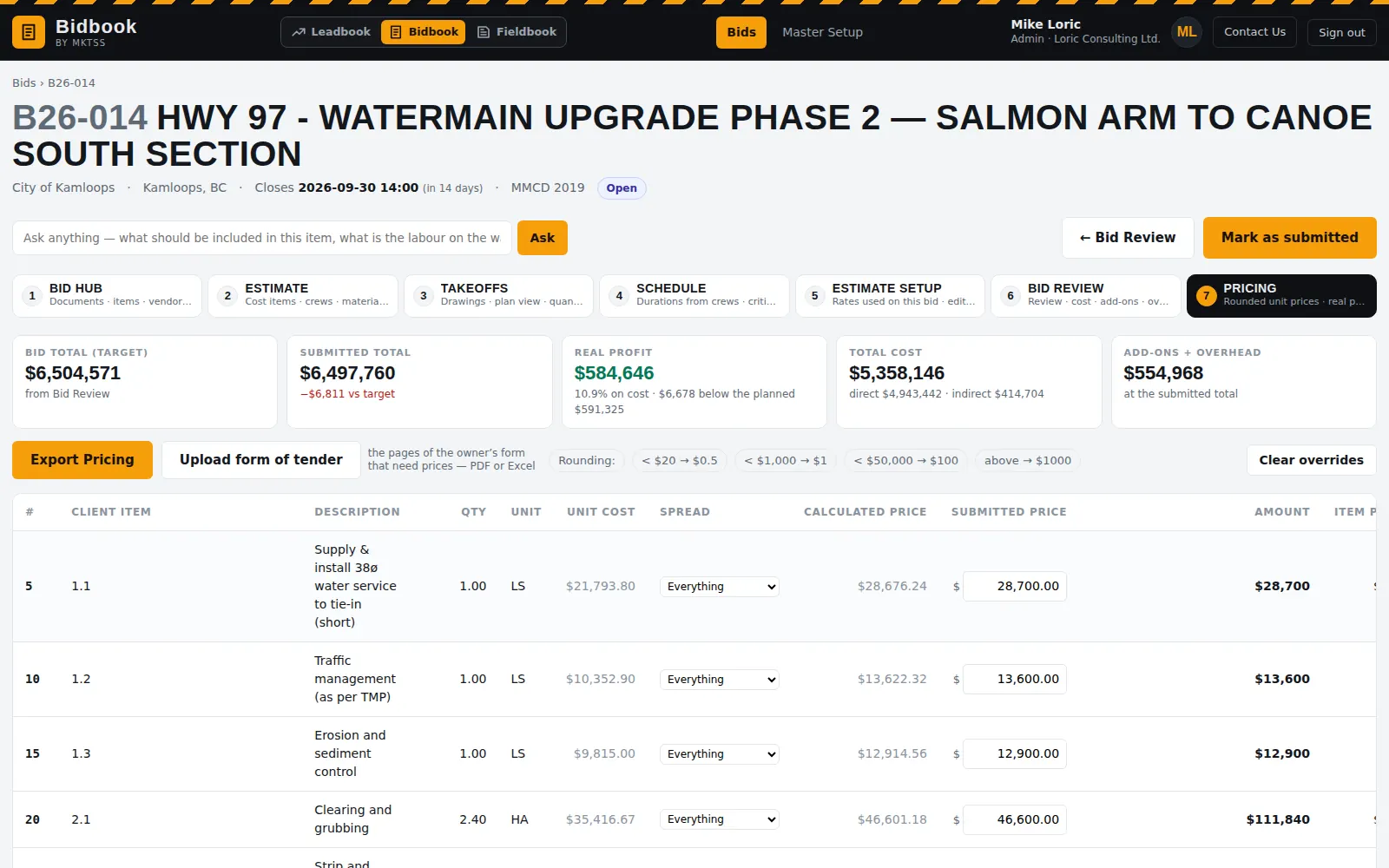
Calculated price per item is its cost plus its share of everything above direct cost, rounded by value band into the submitted price — override any item to sharpen a lump sum or unbalance the schedule, and the strip shows the real profit the submitted prices leave. Every item has a spread option: everything, overhead and profit only, indirects only, profit only, or none for an allowance — and whatever an item leaves out moves onto the others, so the total still lands on the bid.
Export Pricing prints the schedule of prices with the owner's headings and sub-totals, exports it as a workbook or CSV, and fills the owner's own bid form: upload their Excel schedule and the unit price and amount cells are written in place with the formulas untouched; upload their PDF form and the numbers are written into the columns where they belong. Items it cannot place with confidence are listed for you to check.
- Rounding bands you configure ($0.50 under $20, $1, $100, $1,000 above $50,000)
- Item profit and margin per row; real profit, add-ons and overhead at the submitted total
- Schedule of prices PDF / print, Excel workbook with a tender summary, tender form CSV, Fieldbook budget CSV
- Owner's Excel or PDF form filled with the submitted prices — a download, never a change to the tender package
- Mark as submitted; on award, one click creates the Fieldbook project with the budget by bid item and cost code
Ask
A question box on every page that knows the bid
Ask about the bid — "what should be included in this item?", "what is the labour on the watermain?", "how did we bid the 150 mm service last time?", "how did we actually perform on this item?" — and it answers from the tender documents, the estimate, your past bids and Fieldbook's actuals, with a table when a table is the answer. It also answers how to use the software, and it can propose library entries for you to approve, never inventing a unit cost.
Everything in Bidbook today