Live · in pilot with BC civil contractors
Leadbook by MKTSS
Every lead, every tender, one dashboard
Every upcoming opportunity and every tender in hand, with the four things that matter first — client, sector, location, timing. A dashboard that presents itself at the business development meeting, a bid register with hit rates and gap to low bid, and a hand-off that opens the estimate in Bidbook on the same client record.
One client directory across Leadbook, Bidbook and Fieldbook — owners are picked from the list, never typed twice.
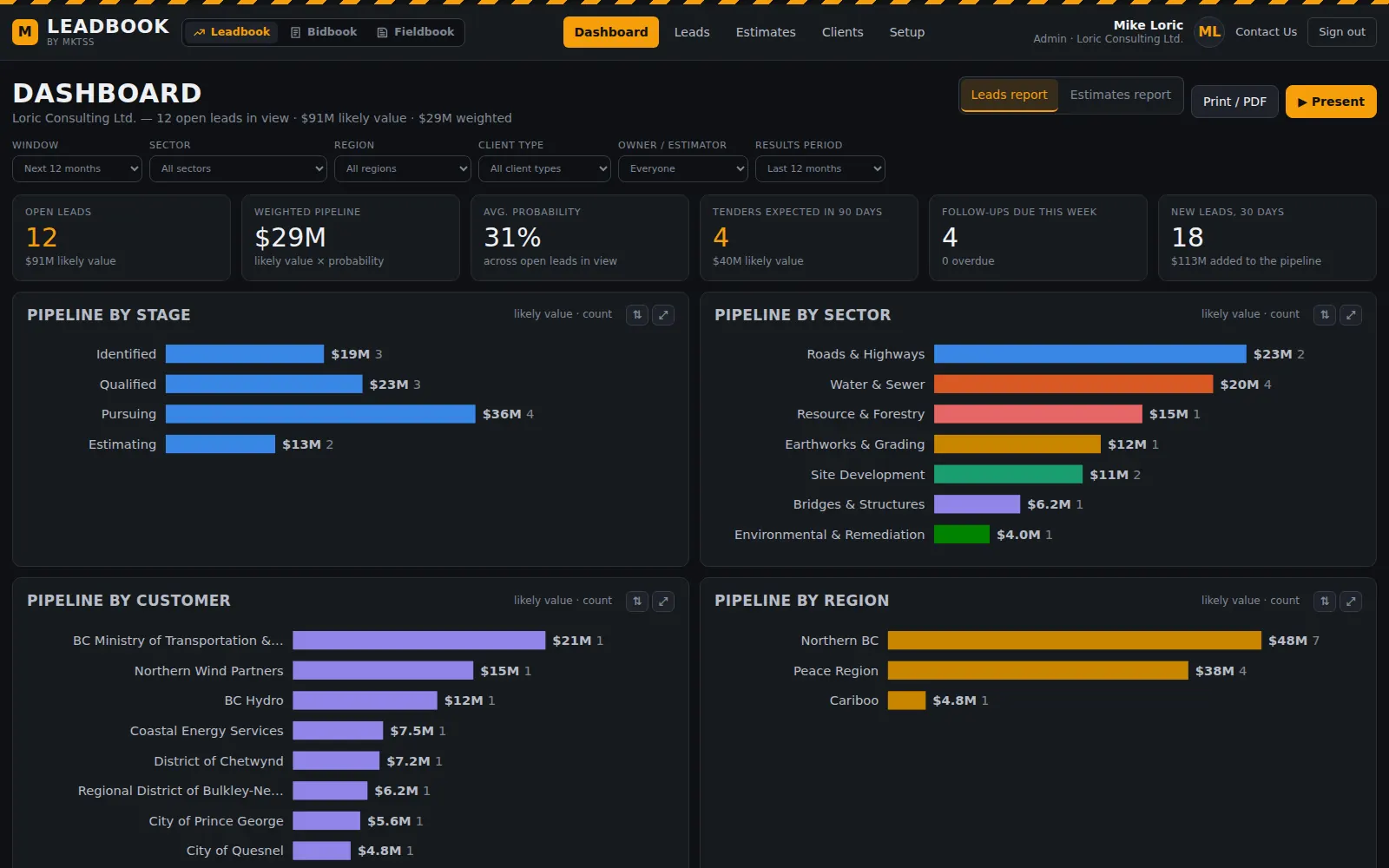
Dashboard
Two reports, and a Present button for the BD meeting
The Leads report is where we stand and what's coming: open leads and likely value, the weighted pipeline, average probability, tenders expected in the next 90 days, follow-ups due this week and overdue, new leads in 30 days — then the pipeline by stage, sector, customer and region, expected tenders by month stacked by sector, a map of the open leads, and the pursuits that need attention.
The Estimates report is tenders in hand and how we've done: what's closing and when, site meetings, workload by estimator, awaiting results, hit rate by count and by value, average bidders, gap to low bid on the ones we lost, margin on the ones we won, submitted vs awarded by quarter, hit rate by sector and by number of bidders.
▶ Present turns whichever report is showing into a full-screen three-slide deck for the meeting — arrow keys, Esc to leave — and Print / PDF puts the same sections on paper. Set the window, sector, region, client type, owner or results period first and the deck follows.
- Leads report: Where we stand · What's coming · Where we are spending our time
- Estimates report: Tenders in hand · How we've done · Recent bids
- Every chart flips horizontal / vertical and maximises to the page; hover for the numbers; every row opens its lead or estimate
- Attention list from rules over your own pipeline: overdue follow-up, tender out with no estimate opened, closing within 7 days, no next action, untouched 45+ days
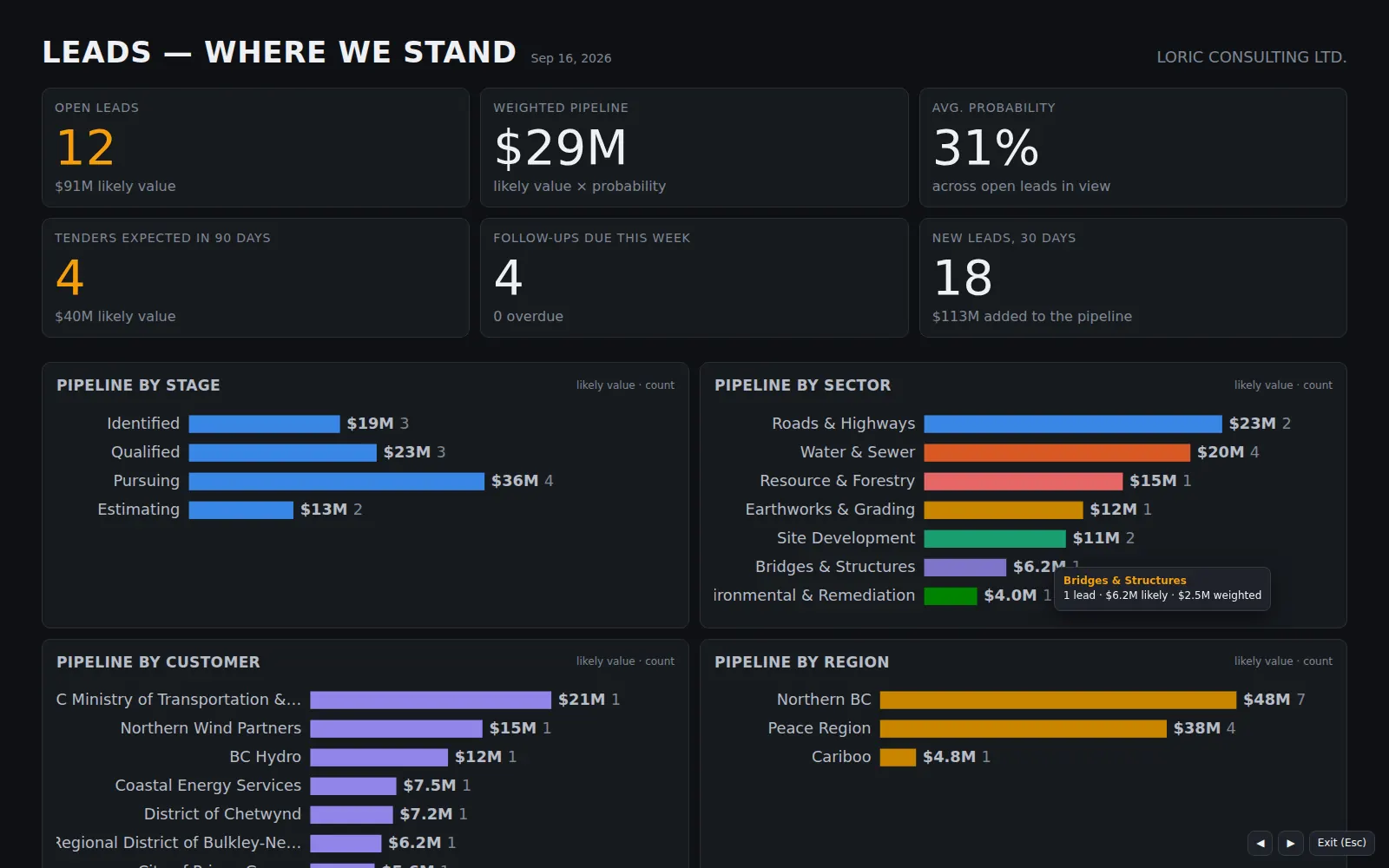
Present mode — the first slide of the Leads deck, full screen.
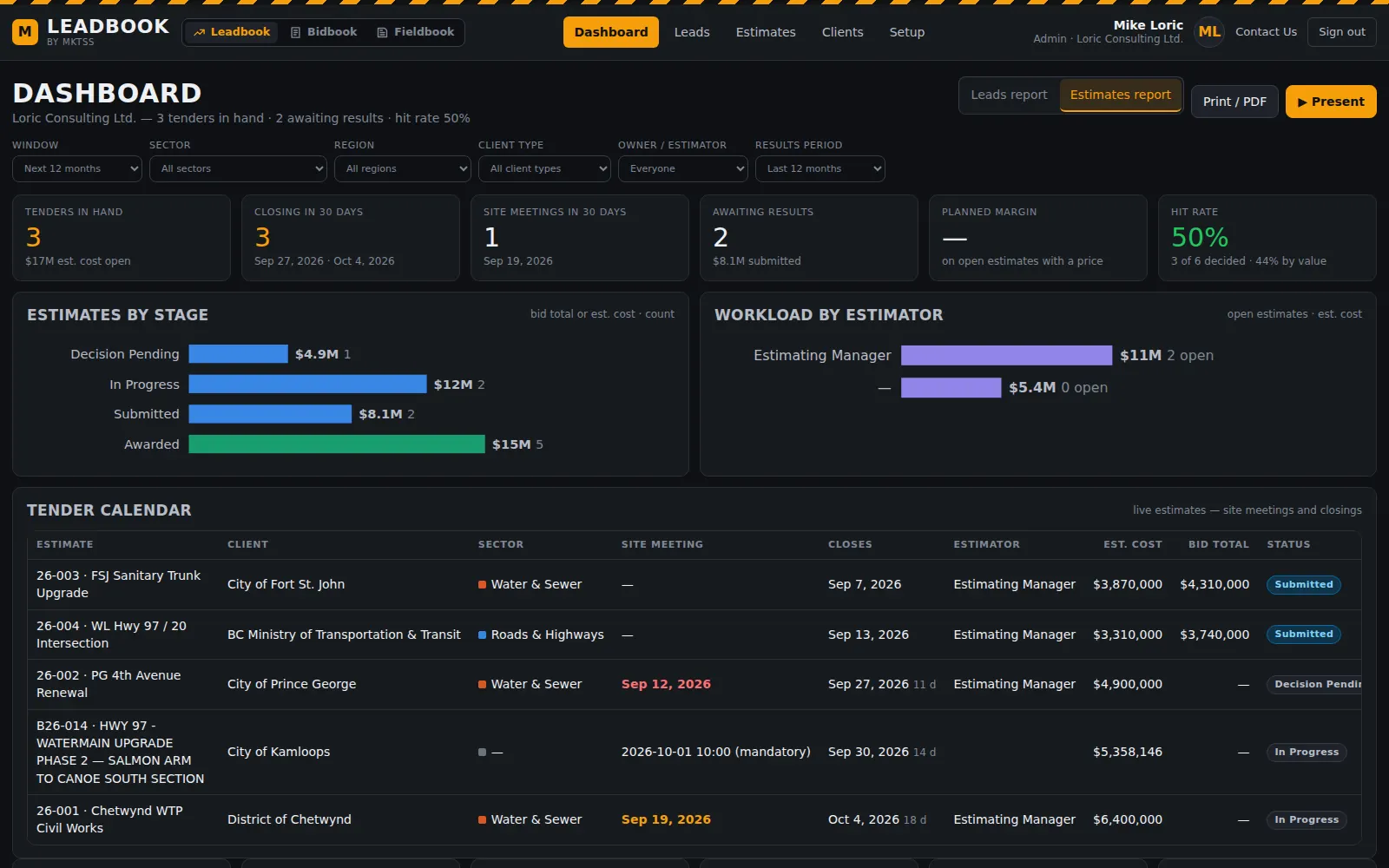
The Estimates report: tenders in hand, hit rate, workload and the tender calendar.
Leads
The pipeline, stage by stage
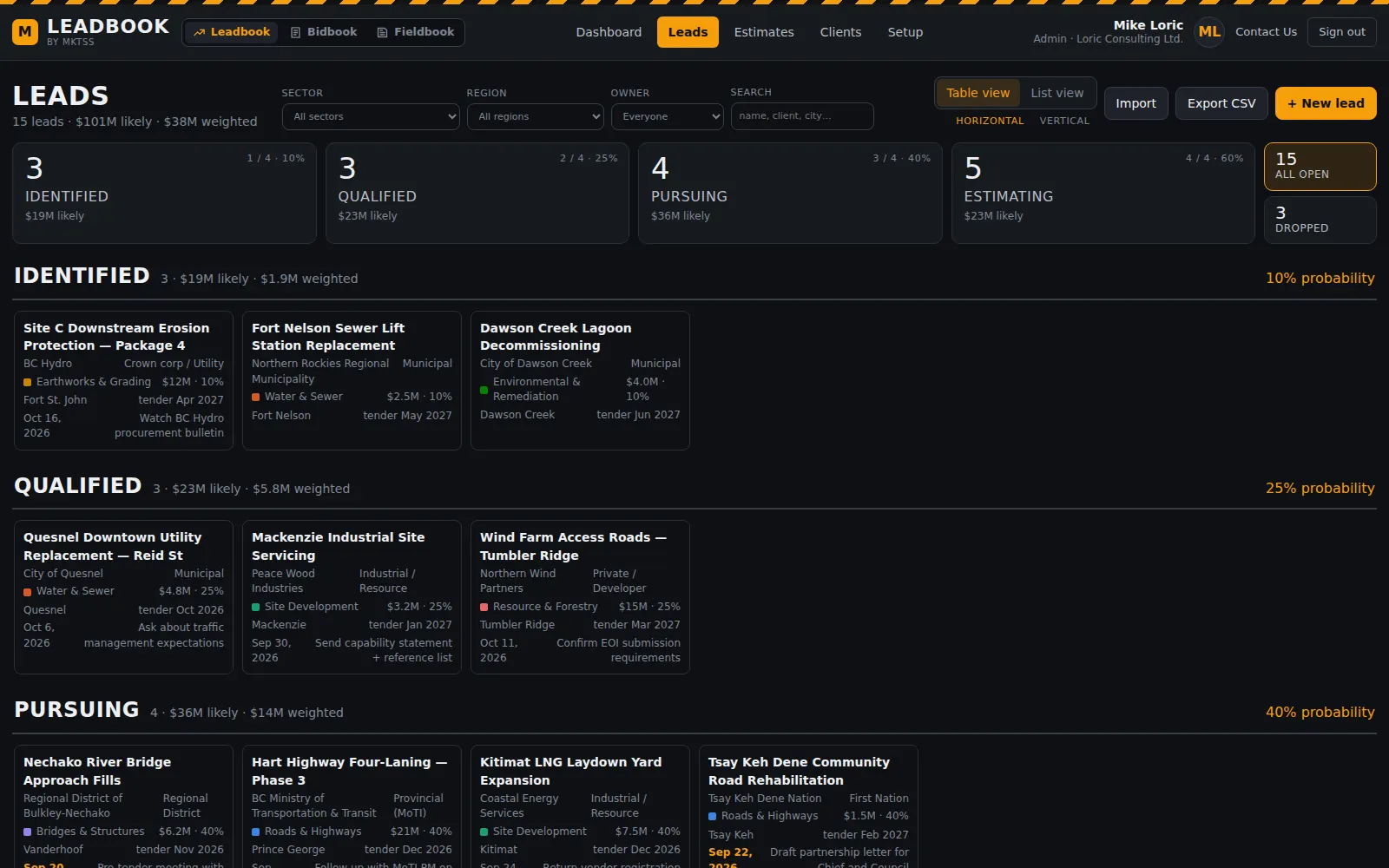
Leads move through four stages — Identified, Qualified, Pursuing, Estimating — each with a probability, and the stages are the page: a strip of tiles with count, value and probability that filter the list, then every opportunity as a tile under its stage. Drag a tile to move it; drag a lead into Estimating and its estimate opens in Bidbook with the client, sector, location and timing carried across.
A lead carries the client and contact, sector and delivery method, site and region, expected tender month, closing, expected award and construction window, a value range with a likely figure, competitors expected, the next action and a dated activity log. A lead that dies is dropped with the reason — lost to a competitor, not our work, owner deferred, too far — so the dashboard can tell you why.
- Table view (tiles under stage headings, horizontal or vertical) and List view (sortable columns), both grouped by stage
- Sector, region, owner and search filters; CSV export of what's showing
- Value as low / high / likely; weighted pipeline = likely × probability; a lead can override its own probability
- Activity log: call, meeting, email, site visit, tender, proposal, decision, result, note — with who
- Once an estimate exists the lead shows the estimate's stage and takes its probability from it
Estimates
The bid register — and the same record Bidbook works from
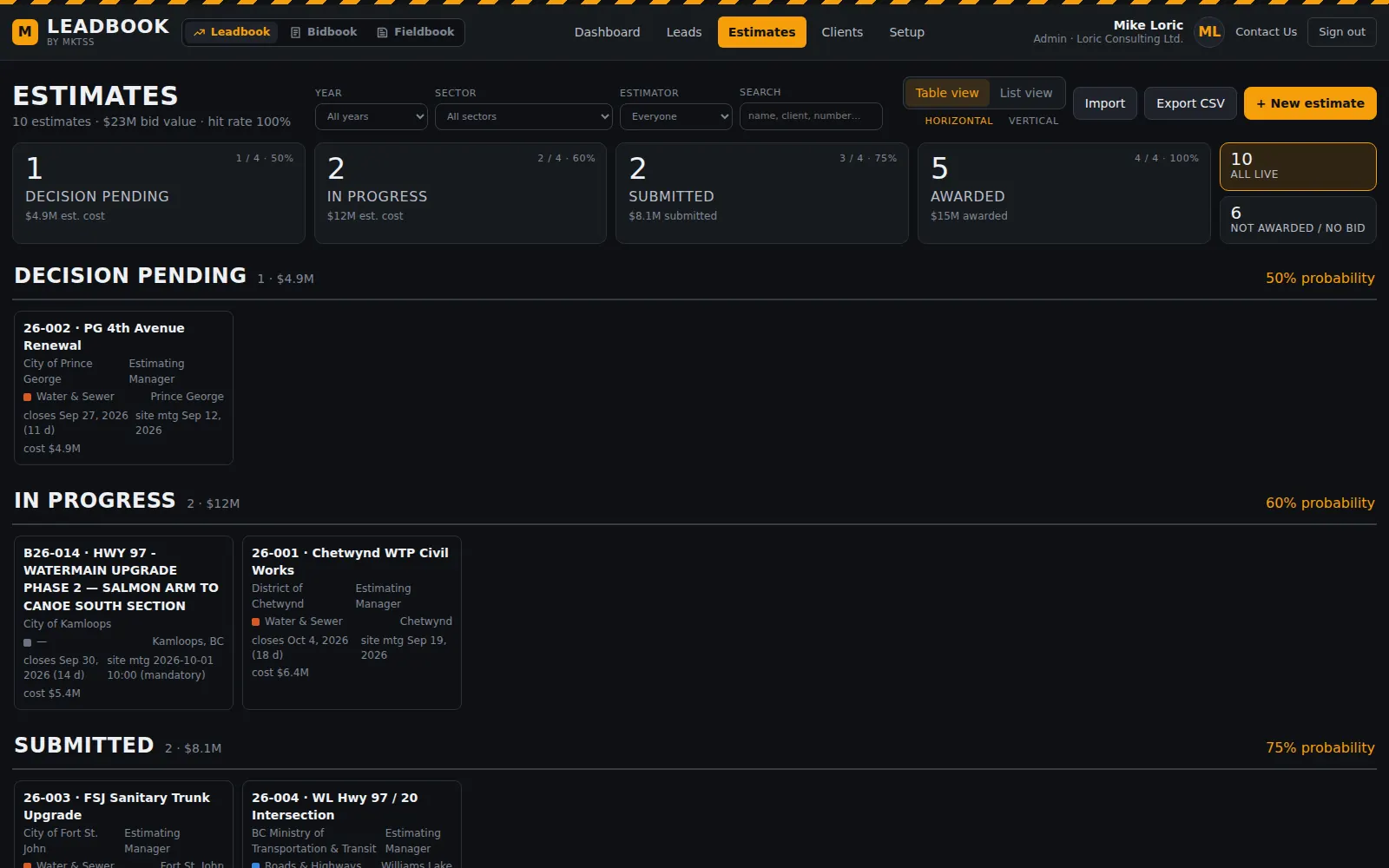
Every tender in hand: Decision Pending, In Progress, Submitted, Awarded, with Not awarded and No bid closing the file. Client, sector, location, closing date and time, site meeting, estimator, contract form and bonding; estimated cost and bid total come from Bidbook once the estimate is priced, and the result — awarded to, low bid, number of bidders, our rank — is recorded on either side.
An estimate in Leadbook is the bid in Bidbook, one record. Open it in Bidbook and the Bid Hub is already there; mark it submitted in either product and both agree. Bidbook's Bids page shows what's coming from Leadbook — the open leads not yet handed to estimating — so the estimators see the pipeline too.
- Stage tiles and Table / List views like Leads; year, sector and estimator filters
- Closing with days left and time, site meeting, cost or bid with margin, rank and gap once decided
- Import a bid log from a spreadsheet — paste or CSV — with the columns mapped for you to confirm
- Hit rate by count and value, average gap to low bid, margin on wins, feeding the dashboard
Clients
One owner record across the whole platform
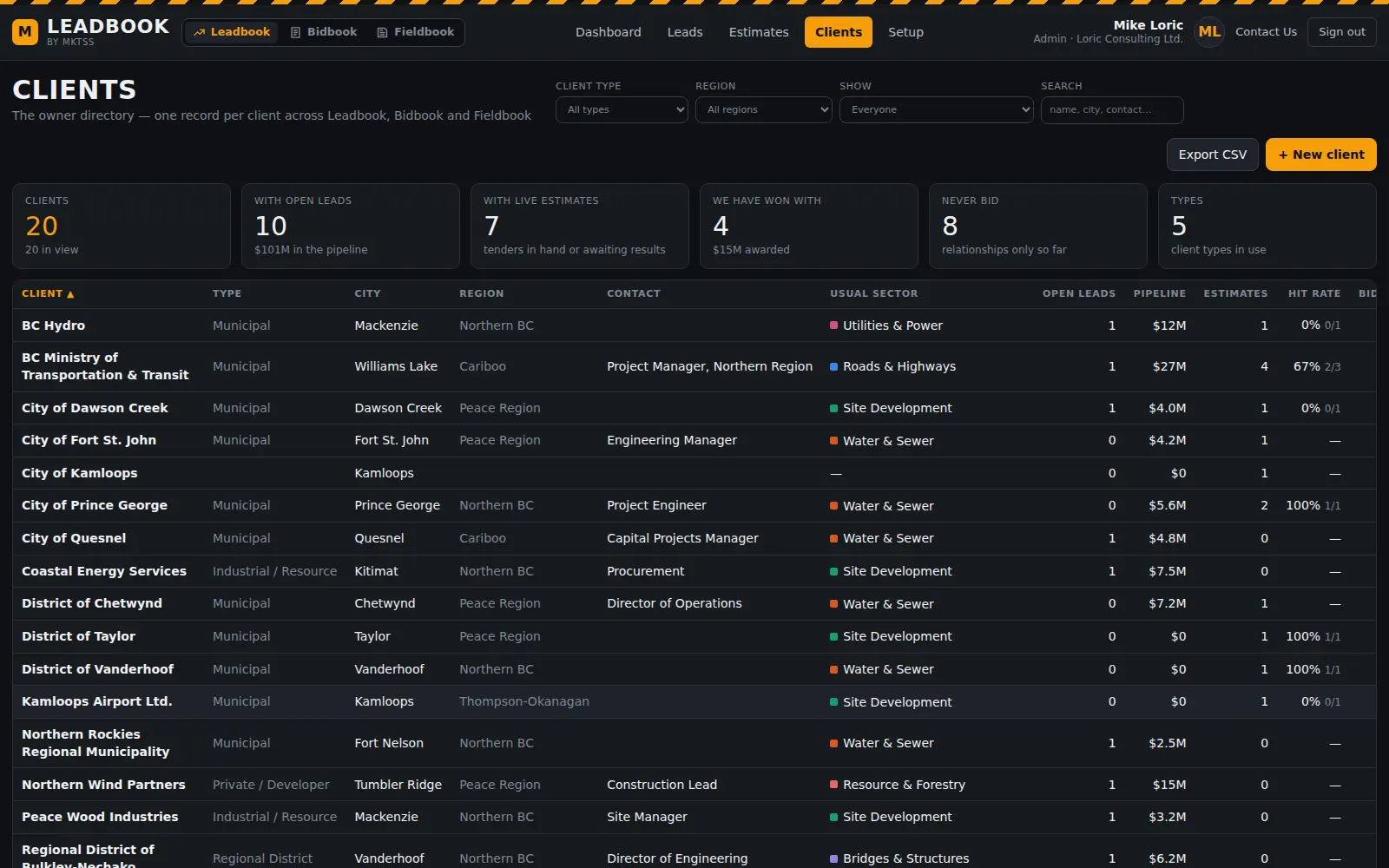
Owners are never typed free-hand. Leadbook, Bidbook and Fieldbook all pick from the same client directory — name, type, contact, city, region, usual sector — and adding a new one happens in the picker itself, with a warning when the name already exists. Pick a client and the client type, region and city fill in.
The Clients page is the directory with the numbers behind each name: open leads and pipeline, estimates and hit rate, bid value, what we've won. Merge a duplicate into the right record and everything moves with it; rename a client and every lead, bid and project follows.
- Shared client directory with type, contact, address, region, usual sector and notes
- Per client: open leads, pipeline, estimates, hit rate, bid value, projects won
- Merge duplicates; rename follows through; delete only when unused
- Link existing owners to the directory in one pass when you bring history in
Setup & import
Your stages, your sectors, your regions
The lists behind every dropdown are yours: rename, add, remove and reorder lead stages and estimate stages with a probability each; sectors in the order you want them charted; regions, client types, delivery methods and lead sources. Bring an existing tracker in by pasting the table from Excel — columns are matched by name, shown for you to correct, and values coerced (money, months, "Roads" → Roads & Highways).
What's next
Where the automation lands
Leadbook's record is built for the model to fill in. In order: a tender watch that scans BC Bid, Civic Info BC and municipal procurement pages daily for your sectors and regions and lands each posting as a suggested lead; capital plans and procurement forecasts read into leads with expected tender months — the "next year" slide before anything is posted; geocoding on save; hit-rate intelligence once results accumulate ("we win at 3–4 bidders, we lose at 6+"), shown beside the markup in Bidbook's Bid Review; and the Ask box — "what's closing next month in the Peace".
Everything in Leadbook today